 11
11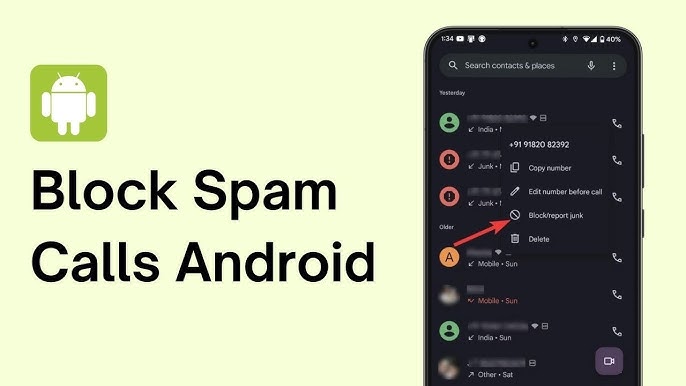
Spam calls have become one of the biggest annoyances for smartphone users in India. From telemarketing offers and loan promotions to scam calls pretending to be banks or government agencies, unwanted calls can interrupt your day and even put your personal information at risk.
If you own an Android phone and are tired of receiving spam calls, the good news is that there are several effective ways to block them. Android devices come with built-in features, and there are also trusted apps that can help identify and stop spam callers before they reach you.
In this guide, you’ll learn exactly how to block spam calls on Android in India and keep your phone free from unwanted interruptions.
Spam calls are unsolicited phone calls made for advertising, marketing, fraud, or scam purposes. These calls are often generated using automated dialing systems and target thousands of users every day.
Common types of spam calls in India include:
Blocking these calls can save time and protect you from potential scams.
Several factors contribute to the rise of spam calls:
Many companies collect phone numbers through online forms, shopping websites, apps, and surveys.
Businesses can now call thousands of people automatically using robocall technology.
When customer databases are leaked or sold, scammers gain access to large numbers of phone contacts.
Cybercriminals increasingly use phone calls to trick users into sharing sensitive information.
Most modern Android smartphones include built-in spam detection features.
Once enabled, Android will automatically warn you when a suspected spam caller is trying to reach you.
If a specific number keeps calling you, you can block it permanently.
The blocked number will no longer be able to call or message you.
Google’s Phone app offers advanced spam detection powered by Google’s database.
Many Android users in India consider this one of the most effective free solutions.
Truecaller remains one of the most popular spam-blocking apps in India.
Truecaller uses a massive community-driven database to identify unknown callers.
India’s telecom regulator provides a Do Not Disturb service that helps reduce promotional calls.
Send:
START 0
to 1909
You can also activate DND through your telecom provider’s mobile app.
Keep in mind that DND may not stop all scam calls, but it can significantly reduce promotional spam.
Many Indian telecom companies now offer spam detection systems.
Airtel’s AI-powered spam detection identifies suspicious calls automatically.
Jio continuously upgrades spam filtering through its network intelligence systems.
Vodafone Idea provides caller identification and spam protection features.
Check your provider’s app for the latest spam protection options.
If you receive too many calls from unknown numbers, you can silence them.
The exact setting name varies by device manufacturer.
Blocking spam calls is only part of the solution. You should also protect your phone number.
Do not post your phone number on social media or public websites.
Before signing up for apps or services, check how your data will be used.
Scammers often use SMS messages to collect phone numbers and personal information.
Banks and legitimate companies never ask for OTPs over phone calls.
Reporting spam numbers helps improve spam databases and protects other users.
If someone claims to be from a bank, government office, or customer support team:
Watch out for these warning signs:
Recognizing these signs can prevent financial fraud.
Spam calls are a growing problem in India, but Android users have several powerful tools available to fight back. By enabling Android’s built-in spam protection, using trusted apps like Truecaller, registering for DND services, and blocking suspicious numbers, you can dramatically reduce unwanted calls.
The best approach is to combine multiple methods. Use Android’s spam detection, activate DND, and stay alert for scam tactics. With these measures in place, you’ll enjoy a safer and less disruptive mobile experience.
The most effective solution is to enable Android’s built-in spam protection and use a trusted caller identification app such as Truecaller. Combining both methods provides maximum protection.
No. DND mainly reduces promotional and marketing calls. Fraudulent or scam callers may still attempt to contact you using unregistered numbers.
Truecaller is widely used and trusted by millions of users worldwide. However, users should review privacy settings and permissions before using any third-party application.
Yes. Many Android phones support automatic spam call filtering through the Phone app’s Caller ID and Spam Protection settings.
Scammers frequently switch phone numbers to avoid detection and blocking. This is why spam databases and caller identification services are important.
Yes. Many Android devices include a feature to silence or block calls from unknown numbers. The exact option depends on your phone manufacturer.
Some spam calls are harmless marketing attempts, but others can be scams designed to steal money, personal information, or banking credentials.